2.3 Billing Account Setup & Governance
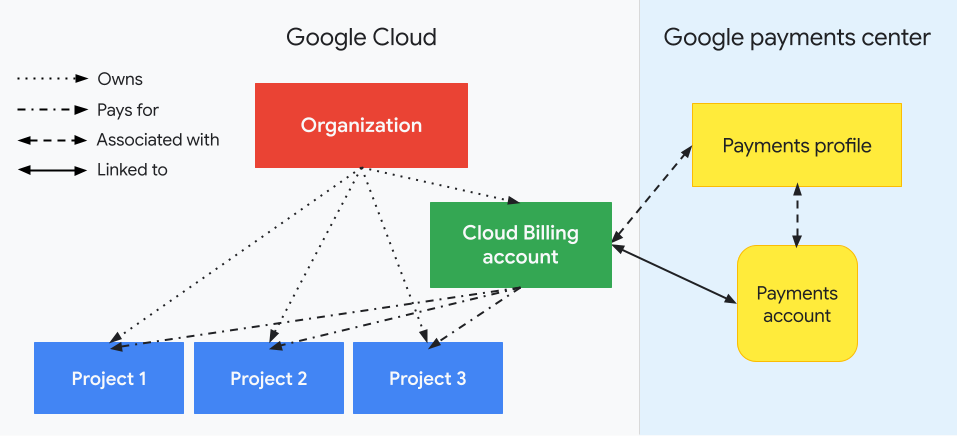
A Billing account sits in its own resource hierarchy, separate from Organization/Folder/Project — this is where most people get confused. It's natural to assume Billing permissions live under Organization IAM too, and to go hunting there without success; they're actually configured under the Billing account's own IAM tab.
The official Google Billing onboarding checklist recommends:
Create a single, centralised Cloud Billing account under your Organization. Only split into multiple billing accounts if you have a concrete reason — separate legal/accounting entities, different currencies, or a need to invoice separately.
Role responsibilities
| Role | What it can do | Who gets it |
|---|---|---|
Billing Account Administrator (roles/billing.admin) | Manage payment methods, enable Billing Export, set budget alerts, link/unlink projects, and manage other people's roles on this billing account | gcp-billing-admins@ — typically the finance or IT lead who actually owns the P&L |
| Billing Account User | Can link a project to the billing account, but cannot unlink it | Teams that need to self-serve project creation, paired with the Project Creator role |
| Project Billing Manager (a project-level role) | Can only link a project they already have permission on to a billing account they already hold the User role on; grants no access to resources inside the project | Used when you want teams to self-serve linking without granting full billing-account access |
Billing Account Administrator permissions must be bound to the billing account itself (the Terraform resource is google_billing_account_iam_member), not the Organization — these are two separate resource hierarchies. See the iam-bindings/ sub-project for details.
Budgets and alerts
Set budgets under Budgets & alerts on the billing account, triggered by either actual spend or forecasted spend, with default thresholds at 50% / 90% / 100%. Alerts can email the Billing Admin, or feed a Pub/Sub topic for automation — for example, automatically disabling billing on a test project once it crosses a threshold, so a forgotten resource doesn't burn through an entire month's budget.
An "alerts only" budget does not automatically stop services or cap usage — it only sends a notification. This is a common misconception: people assume setting a budget means there's a hard ceiling, and are then surprised when the bill blows past it anyway, asking at the end-of-month review why the budget didn't stop the overrun. A budget only gets you earlier warning of a problem, not a brake pedal — if you actually need a usage cap, you have to wire up Pub/Sub automation yourself to disable or downgrade resources.
Billing Export to BigQuery
Enable Billing Export to BigQuery early in the project (at minimum the standard usage cost data; add the detailed usage cost data if you need resource-level breakdowns), because export only starts collecting data from the moment it's enabled — it can't be backfilled. Many teams only think to enable it after a billing problem has already happened, then discover they can't analyse what happened in the past and are left watching the same problem recur next month.
Cost attribution
Tag resources with Labels such as environment, cost-center and team. Labels flow through into Billing Export, letting you answer questions like "how much did the database cost this month?" See 8.1 Resource Tagging / Labelling Strategy for the full tagging governance approach.