5.2 VPC Service Controls (VPC-SC)
IAM governs "who can call this API"; VPC-SC governs "can data be moved outside this boundary at all" — even if IAM is accidentally too permissive, or someone's credentials are stolen, the VPC-SC boundary (a service perimeter) still blocks data from being copied out. Google's own guidance: "we recommend using both VPC Service Controls and IAM for defence in depth" — this is a layered control stacked on top of IAM, not a replacement for it.
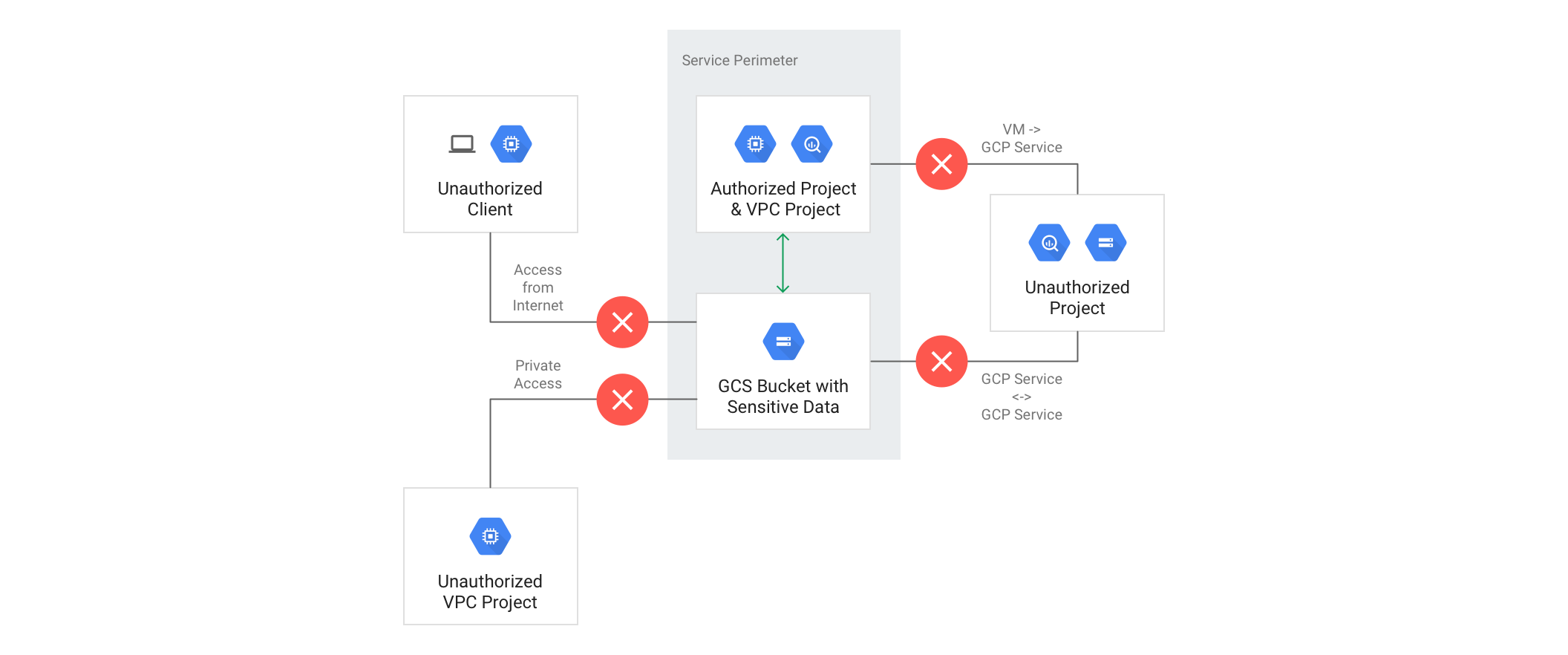
Core concepts
- Service perimeter: fences a group of projects, denying cross-boundary access by default.
- Access level: defines who's allowed in from outside the boundary, based on IP range, device policy, or identity allowlist.
- Ingress / egress rule: a more granular exception mechanism than a perimeter bridge — Google explicitly recommends against designs with multiple bridges or a DMZ perimeter; if an ingress/egress rule solves the use case, don't stack a bridge on top instead.
Getting VPC-SC wrong operates at a "it can genuinely take production down" level of severity — it's not the "misconfiguration causes apply to fail" kind of safe failure; it's "the apply looked successful, and now CI/CD or a cross-project data pipeline is completely severed." Google specifically calls out the things people most often forget to place inside the boundary: service accounts belonging to automation tools like Terraform/Jenkins, on-premises traffic arriving via VPN/Interconnect (which is evaluated as belonging to whichever VPC project the connection terminates in — including the host project for a Shared VPC), and the Google-managed service account used for Cloud Logging exports. Applying VPC-SC without first inventorying these exceptions is a bet against production stability.
Recommended rollout process
Because the stakes are this high, Google's own recommended process is:
- Inventory every legitimate access pattern first (Google even provides a ready-made inventory template PDF)
- Build the boundary in dry-run mode (logs violations only, blocks nothing)
- Have every team run their normal workloads as usual
- Analyse the violations dry-run has logged
- Only once every violation is a confirmed, expected exception, actually enforce
Google's own Security Foundations Blueprint also only ever deploys VPC-SC in dry-run mode by default, leaving the decision to enforce entirely up to each organisation's own evaluation.
Deciding to roll out VPC-SC a week before a compliance audit, with a hard "must be enforced by this week" deadline, is the most common — and most dangerous — shortcut you'll see. Skipping any step of that inventory-and-dry-run process means treating production as the test environment. How long the dry-run observation period needs to run for depends entirely on how complex your usage patterns actually are; there's no "ship it this week" fast path.
Full detail on perimeter design and the dry-run-to-enforce process lives at security-products/docs/vpc-service-controls.md.